zfs
zfs - adding a disk to existing vmpool
12:41
welp i was hoping to increase overall expansion and capactity with this by adding a 4tb disk to the existing 3x1tb raidz1-0 but all it did was add and additional 1TB of storage/redundancy.
that is ok for now, but i will likely want to destroy that zfs partition and setup a different raid with a 4tb mirror for redundancy...however, as it is already done. it is not reversible without destroying and recreating.
i had this drive laying around and had to open my server to fix a wonky ram in DIMM B1 anyway so here we are.
rebooted > new drive detected (this is a 4tb nvme drive) > get all the vm/lxc running and to command prompt.
first i wanted to check that the pool was what i thought it was and id new drive name:
zpool status -v vmpool
lsblk
the new drive is identified as nvme0n1
for my pool i see the existing three disks...so now to add the new disk
zpool attach vmpool raidz1-0 nvme0n1
this gave me an error so i had to upgrade the pool with the following command, then retry
zpool upgrade vmpool
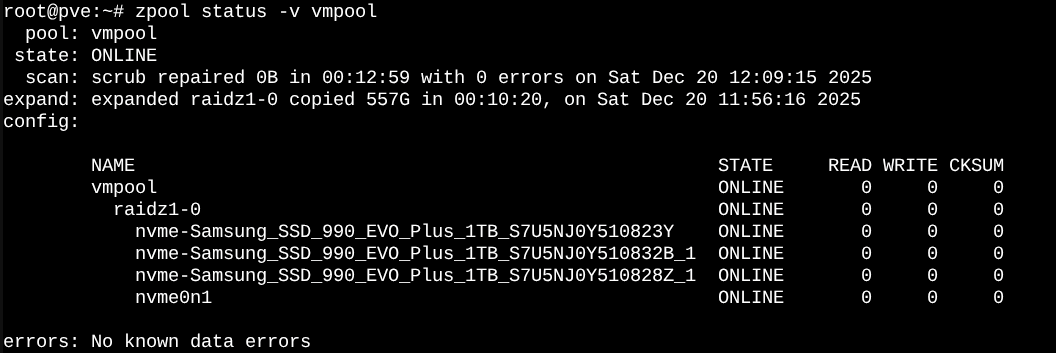
not much info given in this process, just back to prompt so i ran the status line again. this showed me the disk was added, but that the capacity was still the same, after a little websearching ( i dont google anymore ;} ) i found i needed to expand the capacity with the following command:
zpool set autoexpand=on vmpool
and then to get the drives to reinitialize...
zpool online -e vmpool nvme0n1
after this command everything showed up correctly using the status command:
https://ostechnix.com/move-proxmox-containers-vms-to-different-disk/
this looks like a pretty good guide, and will update as i go through the process of redoing the storage for my vms and lxc containers.